
HDClone 9 brings additional new apps to replace and enhance the previous program functions VM Image, SmartImage, SmartCopy, Restore. These previous program functions will remain in the Classic tab until the next version in order to provide an easier transition for users.
The newly arranged system bar offers an improved overview as well as new functions. Several menu items, such as the Screenshot function, have been reorganized. The License applet provides convenient access to online product and license information. The Notify applet, which informs of Service Updates, now also allows you to clear the download.
The support of Windows Server systems (Professional Edition and higher) represents another change. With version 9, instead of the runtime system, the data source (disk or image) is now the crucial factor. As a result, the Professional Edition is the minimum required Edition when copying, backing up or restoring Windows Servers.
The single file image format MFI, already introduced with HDClone 8, becomes the default format in HDClone 9.
With DataSelect, you can select individual files and folders from the source, which saves copying time and storage space. It also allows you to migrate disks on which the total amount of data is actually too large. Backups and images can be narrowed down to specific files and folders.
| |
| DataSelect |
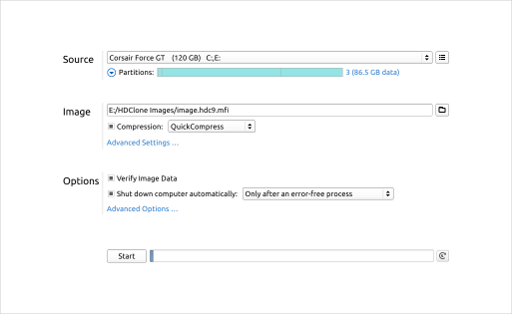
The completely newly developed apps replace the previously used program functions for copying and restoring images and backups. The new apps facilitate the use of the program by providing a more comprehensive layout. In addition, the also newly developed features PartitionSelect, PartitionResize and DataSelect as well as the new status indicator and the improved reports have been integrated.
 |
| SmartCopy |
If common Linux installations are enlarged or reduced in size during copying or restoring, HDClone can now adjust them in a way that they remain bootable despite resizing.
Thanks to the specific support for the official boot images of Raspberry Pi and Windows 10 IoT, HDClone 9 is able to transfer or copy them directly to a boot media (SD card) and can also automatically enlarge or reduce their size, if necessary.
Copies and images from the system drive that are created on Windows with HDClone/W during a running operation (HotCopy and LiveImage), can now subsequently be verified.
VM Image & SmartImage have been enhanced by the features PartitionSelect, DataSelect, the new status indicator and by new and improved reports.
 |
| SmartImage |
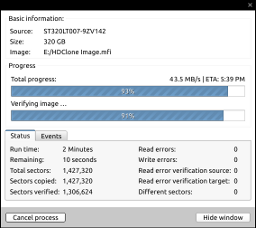
The newly developed and comprehensively arranged status indicator offers a much clearer overview of essential and detailed information both during an active process and once the process is completed.
 |
| Progress and Status |
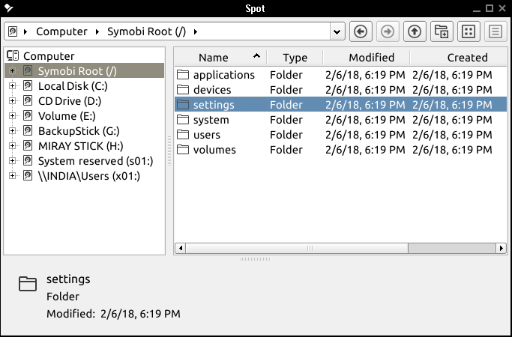
To date, the app Spot had been a mere file browser that was used to view folder structures and files. Now you can also use the app to copy, move and delete files and folders, especially in the self-booting variants HDClone/S and HDClone/L.
 |
| Spot File Manager |
The features to select partitions (PartitionSelect) and to adjust partition sizes (PartitionResize) have been completely renewed. Both have been designed for enhanced simplicity and clarity. Also, any changes can be more comprehensively managed and conveniently monitored.
 |
| PartitionSelect |
 |
| PartitionResize |
The new apps also come with new and improved reports that contain useful advanced information.
The Virtual Disk applet can now also open overlays as well as create new ones. This allows you to save changes to the Virtual Disk without changing the original image. Until now, this was only possible with Miray Virtual Disk (MVD) on Windows. It is now also available in the self-booting variants HDClone/S and HDClone/L.
 |
| Virtual Disks (Applet) - Mounting options |
The new Spot File Manager also allows the self-booting variants HDClone/S and HDClone/L to access individual files and folders within an image by first mounting them with the Virtual Disk applet. Up until now, this could only be done on Windows (HDClone/W), and only with Miray Virtual Disk (MVD).
The Boot Setup, which creates boot media with HDClone/S, and optionally HDClone/L and HDClone/S64 on Windows, now supports 64-bit. This allows boot media to be created on a pure 64-bit Windows (without WoW64, e.g. Windows PE 64).
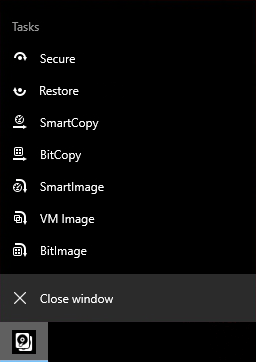
On Windows (HDClone/W), the most important apps can now be started directly from a jumplist. HDClone can also be opened through the Windows Explorer by right-clicking on an HDClone image.
 |
| HDClone jumplist in Windows 10 |
The self-booting variant HDClone/S64 for 64-bit systems extends the usable RAM from 2 GB to as much as 256 terabytes. A number of program functions benefit from this, especially the new DataSelect.
HDClone's command line interface (CLI) on Windows (HDClone/W) has been redeveloped from the ground up. It facilitates the integration into scripts, including redirection of the output. Moreover, the CLI has been divided into task-specific modules. The new development brings a lot of enhanced details, such as direct help with syntax highlighting and a faster program start.
Write access to files and folders is now possible for Ext2, Ext3 and Ext4 file systems. Images can therefore be saved directly on Ext disks. With the new Spot File Manager you can also copy and delete files and folders directly to and from Ext disks.
The Spot File Manager can copy files and folders between HDClone-supported file systems. This allows access to Ext, XFS, BtrFS, HFS+, and APFS even on Windows with HDClone/W, although these are not supported by Windows.
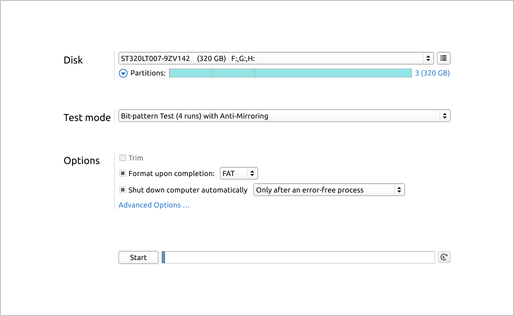
This disk surface test can be used to check disks, SSDs, flash drives and USB sticks for faulty memory. The scope ranges from basic tests to advanced quality assurance tests.
 |
| DiskTest |