Deleting a Sector Area
When it comes to the deletion of an area, the media is not deleted in its entirety, but only a part (drive or partition).
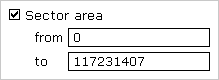
An exact sector area on the media can be chosen in the Options page. Check the Sector area box and enter the beginning (from) and end (to) sector of the area, which will be included in the area due to being interpreted as its first and last sector.
 |
|
| fig.: Sector area |
| Note: The count starts at '0' (= first sector of the media), meaning that all of the following sector numbers have to be decreased by 1 (e.g. from = 0, to = 99 defines the first 100 sectors on the media as an area). |
| Warning: Only use area deletion if you are completely clear on how it works. A an improperly defined sector area may cause undeleted data to remain on the media. |
The sector area is always subordinated to the selected media (drive or partition) and is interpreted relative to the starting position of the media. Instead of using the entire media for the deletion process, only the defined sector area will be used. The only difference to a normal deletion is that, instead of deleting the entire drive or partition, only the defined partial area will be deleted.
| Example: Sector area from = 0, to = 31. For drives, this defines the (absolute) first 32 sectors. The absolute position of the partition's first 32 sectors depends on its (absolute) start on the drive. |


